What is an Online Form and How Does an Online Form Builder Work?
In today’s digital landscape, online forms play a crucial role in collecting information, facilitating transactions, and streamlining workflows. Whether you’re signing up for a newsletter, completing a survey, or registering for an event, chances are you’ve encountered an online form. But what exactly is an online form, and how does an online form builder make the process of creating them so effortless?
What is an Online Form?
An online form is a digital version of a traditional paper form, designed to collect and process data over the internet. It typically consists of input fields like text boxes, checkboxes, dropdown menus, radio buttons, and more. Users can fill in their responses, submit the form with a single click, and have the data immediately transmitted to a secure database or email. Online forms are used for various purposes, including lead generation, customer feedback, order processing, and event registrations.
The appeal of online forms lies in their efficiency. They eliminate the need for manual data entry, reduce errors, and allow for instant access to submitted information. Additionally, online forms can be designed to include conditional logic, making them more interactive by dynamically displaying or hiding fields based on user input.
How Does an Online Form Builder Work?
An online form builder, sometimes called a form creator, is a tool that simplifies the process of designing and deploying online forms. With no coding knowledge required, users can create professional forms tailored to their needs. Here’s how it typically works:
1. Choosing a Template or Starting from Scratch
Most online form builders offer a library of templates to suit common use cases, such as surveys, contact forms, and payment forms. For instance, Jazz Form provides a variety of templates that users can customize to meet their specific requirements. Alternatively, users can start with a blank canvas to build a custom form from scratch.
2. Customizing the Form
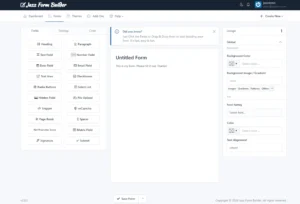
Using a drag-and-drop interface, users can add and arrange form fields as needed. These fields can include text input, file uploads, rating scales, and more. Customization options allow users to modify colors, fonts, and branding to match their website or organizational style.
3. Adding Advanced Features
Form builders often include advanced features like:
- Conditional Logic: Show or hide fields based on previous answers.
- Payment Integration: Collect payments securely via platforms like PayPal or Stripe.
- Workflow Automation: Send data to other apps or notify team members upon form submission.
4. Publishing the Form
Once the form is ready, users can share it through a direct link, embed it on their website, or integrate it with other digital platforms. Modern form builders ensure that forms are mobile-responsive, providing an optimal experience across all devices.
5. Analyzing the Data
After submissions are collected, the builder’s dashboard provides tools to analyze the data. For example, Jazz Form offers features like custom reporting and data visualization, enabling users to make informed decisions with ease. Users can export responses, generate custom reports, or visualize trends to gain actionable insights.
Benefits of Using an Online Form Builder
Online form builders are a game-changer for businesses and individuals alike. They save time, reduce development costs, and make it easy to create forms that are both functional and visually appealing. Furthermore, built-in security measures like data encryption and CAPTCHA ensure the safety of user information.
In summary, an online form is a versatile tool for collecting information digitally, and an online form builder makes creating these forms accessible to everyone. Whether you’re a small business owner, a nonprofit organization, or a corporate professional, leveraging an online form builder like Jazz Form can help you streamline your data collection processes and achieve your goals efficiently.